Rect Collision Response
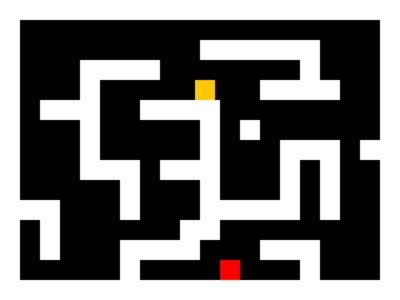
A simple demo on how to do side-based rect collision response.

pymike
(pymike)
Concept
I'm putting this here since it's not in the download. Basically how it works is when you move a rect, you first move along the X axis, test for a collision, move out, then move along the Y axis, test for a collision, and move out. This prevents the infamous "corner-catching" bug, and lets you move smoothly along walls.
#! /usr/bin/env python

import os
import random
import pygame

# Class for the orange dude
class Player(object):

    def __init__(self):
        self.rect = pygame.Rect(32, 32, 16, 16)

    def move(self, dx, dy):

        # Move each axis separately. Note that this checks for collisions both times.
        if dx != 0:
            self.move_single_axis(dx, 0)
        if dy != 0:
            self.move_single_axis(0, dy)

    def move_single_axis(self, dx, dy):

        # Move the rect
        self.rect.x += dx
        self.rect.y += dy

        # If you collide with a wall, move out based on velocity
        for wall in walls:
            if self.rect.colliderect(wall.rect):
                if dx > 0: # Moving right; Hit the left side of the wall
                    self.rect.right = wall.rect.left
                if dx < 0: # Moving left; Hit the right side of the wall
                    self.rect.left = wall.rect.right
                if dy > 0: # Moving down; Hit the top side of the wall
                    self.rect.bottom = wall.rect.top
                if dy < 0: # Moving up; Hit the bottom side of the wall
                    self.rect.top = wall.rect.bottom

# Nice class to hold a wall rect
class Wall(object):

    def __init__(self, pos):
        walls.append(self)
        self.rect = pygame.Rect(pos[0], pos[1], 16, 16)

# Initialise pygame
os.environ["SDL_VIDEO_CENTERED"] = "1"
pygame.init()

# Set up the display
pygame.display.set_caption("Get to the red square!")
screen = pygame.display.set_mode((320, 240))

clock = pygame.time.Clock()
walls = [] # List to hold the walls
player = Player() # Create the player

# Holds the level layout in a list of strings.
level = [
"WWWWWWWWWWWWWWWWWWWW",
"W                  W",
"W         WWWWWW   W",
"W   WWWW       W   W",
"W   W        WWWW  W",
"W WWW  WWWW        W",
"W   W     W W      W",
"W   W     W   WWW WW",
"W   WWW WWW   W W  W",
"W     W   W   W W  W",
"WWW   W   WWWWW W  W",
"W W      WW        W",
"W W   WWWW   WWW   W",
"W     W    E   W   W",
"WWWWWWWWWWWWWWWWWWWW",
]

# Parse the level string above. W = wall, E = exit
x = y = 0
for row in level:
    for col in row:
        if col == "W":
            Wall((x, y))
        if col == "E":
            end_rect = pygame.Rect(x, y, 16, 16)
        x += 16
    y += 16
    x = 0

running = True
while running:

    clock.tick(60)

    for e in pygame.event.get():
        if e.type == pygame.QUIT:
            running = False
        if e.type == pygame.KEYDOWN and e.key == pygame.K_ESCAPE:
            running = False

    # Move the player if an arrow key is pressed
    key = pygame.key.get_pressed()
    if key[pygame.K_LEFT]:
        player.move(-2, 0)
    if key[pygame.K_RIGHT]:
        player.move(2, 0)
    if key[pygame.K_UP]:
        player.move(0, -2)
    if key[pygame.K_DOWN]:
        player.move(0, 2)

    # Just added this to make it slightly fun ;)
    if player.rect.colliderect(end_rect):
        raise SystemExit, "You win!"

    # Draw the scene
    screen.fill((0, 0, 0))
    for wall in walls:
        pygame.draw.rect(screen, (255, 255, 255), wall.rect)
    pygame.draw.rect(screen, (255, 0, 0), end_rect)
    pygame.draw.rect(screen, (255, 200, 0), player.rect)
    pygame.display.flip()
Changes
Links
Releases
Pygame.org account Comments
-
Sillyurs 2011-08-26 13:54
The link is broken...
asdasdasd 2013-10-28 13:00
swag on u
-
CHAD2430 2014-06-12 15:29
Used the collision detection code on my own project, but the block warps outside the walls provided and is invisible.
-
Duality 2014-09-16 21:54
and how do you do the collsion detection part without using the rect class ? i am trying to understand how this all works.
-
piglet coder 2015-09-10 00:02
How do I use sprites for the walls and player instead of solid colors?
The Orca 2015-09-11 06:25
You'd just blit the sprites into place rather than drawing rects for them. For example, where it says:
pygame.draw.rect(screen, (255, 200, 0), player.rect)
You could replace that with:
screen.blit(sprite, player_x_coordinate, player_y_coordinate)You'd naturally need to make sure the player's x and y coordinates are tracked well. Also, make sure to convert the sprite first. While you can just put the file you wish to use as an image there, it will be extremely slow if not converted outside your game loop.
piglet coder 2015-11-12 23:25
Oh cool thank you☻☺☻☺☻☺☻☺☻☺☻☺!..
I'll do something like this.
|
\/es_04 2018-05-28 17:09
Could you please post the code for sprites in walls and player here? -
rollz 2015-09-19 19:05
lol
-
James Witherspoon 2015-10-07 18:57
Hi there, what version of pygame and python is this using? Thanls
-
JBalisticMC 2015-10-24 13:25
bif="bg.jpg"
mif="Untitled.png"
pot="Untitled23.png"
lol="pin.png"red = (255,0,0)
import pygame, sys, random, time, os
from pygame.locals import *AppleThinkness = 30
block_size = 20
FPS = 15appleimg = pygame.image.load('apple.png')
pygame.init()
screen=pygame.display.set_mode((700,400),0,32) #Sets screen size to 640 x 360 @ 32 bit
pygame.display.set_caption('Frantic Balloon Pops')icon = pygame.image.load('Untitled-icon.png')
pygame.display.set_icon(icon)ball=pygame.image.load(mif).convert_alpha()
background=pygame.image.load(bif).convert()
pin=pygame.image.load(lol).convert_alpha()smallfont = pygame.font.SysFont("comicsansms", 25)
medfont = pygame.font.SysFont("comicsansms", 50)
largefont = pygame.font.SysFont("comicsansms", 80)lead_x = 700/2
lead_y = 400/2lead_x_change = 10
lead_y_change = 0lead_x += lead_x_change
lead_y += lead_y_changedef score(score):
text = smallfont.render("Score: "+str(score), True, red)
screen.blit(text, [0,0])SPAWN_LOCATIONS = []
def spawn_balls():
# Don't have this in the loop as you only want them to spawn once when the game starts, not every time the game loops.
NUMBER_OF_BALLS_TO_SPAWN = 300
for i in range(0,NUMBER_OF_BALLS_TO_SPAWN):
# This will happen the number of times equal to NUMBER_OF_BALLS_TO_SPAWN at the moment 6.# Generate a random x position, between 0 and 640 (Screen width.)
x_pos_ball = random.randint(0,700-54) # 54 is the size of the ball image, adust end points so they are on screen.
# Generate a random y position, between 0 and 360 (Screen height.)
y_pos_ball = random.randint(0,400-54)# Draw the ball at the random position
SPAWN_LOCATIONS.append((x_pos_ball,y_pos_ball))def text_objects(text,color,size):
if size == "small":
textSurface = smallfont.render(text, True, color)
elif size == "medium":
textSurface = medfont.render(text, True, color)
elif size == "large":
textSurface = largefont.render(text, True, color)def message_to_screen(msg,color, y_displace=0, size = "small"):
textSurf, textRect = text_objects(msg, color, size)
#screen_text = font.render(msg, True, color)
#gameDisplay.blit(screen_text, [display_width/2, display_height/2])
textRect.center = (400 / 2),(700 / 2)+y_displace
screen.blit(textSurf, textRect)# SPawn all the balls.
spawn_balls()
while True:
for event in pygame.event.get():
if event.type == QUIT:
pygame.quit()
sys.exit()
screen.blit(background, (0,0))score (0)
# Commented out all this stuff as we dont't need it for random spawning.
"""# so this is where you list all of the locations for each circle...
spawn_locations = [(0,0),(50,50),(100,100),(150,150),(200,200),
(250,250),(300,300),(350,350),(400,400),(0,1),
(0,50),(0,100),(0,150),(0,200),(0,250),(0,300),(0,350),
(0,-1),(0,-50),(0,-100),(0,-150),(50,0),(100,0),(150,0),(200,0),
(250,0),(300,0),(350,0),(400,0),(450,0),(500,0),(550,0),(600,0),(650,0),(700,0),
(750,0),]# so it is just like the fruits where fruits = ["apple", "pear", "some other fruit..."] but instead
# "apple" is changed for (0,0) which is the coordinate for where you create the circle
# and this will go through each location i.e (0,0) and blit to the screen a cirle at that location
# so all you have to do to add more is add more locations to the spawn_locations list"""
for spawn_location in SPAWN_LOCATIONS:
screen.blit(ball, spawn_location)x,y = pygame.mouse.get_pos()
x -= pin.get_width()/2
y -= pin.get_height()/2screen.blit(pin,(x,y))
pygame.display.update()
-----------------------------------------------------------------------------------------------------------------
I want when the 'pin' touches the 'balloon' than it will pop. How do I do this? and what do I add? -
Max 2016-01-09 16:19
Thank you very much :-)
-
xXMartinBauzaXx 2016-05-18 23:49
if you are here that means than you actually have pygame so copy the source code and
paste it!!! -
Pavel stanley 2016-08-15 13:31
This tut helped me a lot. Thank you very much.
-
ridgen 2018-04-09 12:05
very nice


Recent Releases
 pgRPG - ECS pygame Game Engine - 0.1.0
4 Feb, 2026
pgRPG - ECS pygame Game Engine - 0.1.0
4 Feb, 2026
 AS Arrow - v 0.1.4
28 Jan, 2026
AS Arrow - v 0.1.4
28 Jan, 2026
 koxinga - v0.3.3
27 Jan, 2026
koxinga - v0.3.3
27 Jan, 2026
 PyDPainter - Release 2.2.1
21 Jan, 2026
PyDPainter - Release 2.2.1
21 Jan, 2026
 Trosnoth - 1.23.0
18 Jan, 2026
Trosnoth - 1.23.0
18 Jan, 2026
 Royal Ordains - 0.2.4
5 Jan, 2026
Royal Ordains - 0.2.4
5 Jan, 2026
 Divide & Conquer - 1.0
21 Dec, 2025
Divide & Conquer - 1.0
21 Dec, 2025
 HarnessIT - 0.1
11 Dec, 2025
HarnessIT - 0.1
11 Dec, 2025
 Imperial Ambitions - Three Kingdoms - Beta 1.2
6 Dec, 2025
Imperial Ambitions - Three Kingdoms - Beta 1.2
6 Dec, 2025
 SUPER JUMP DUDE - 0.6.1
ALL the tags!