Life as a Bit - DLX-1.00
A full-featured cellular automata simulator. The focus is on "Conway's Game of Life." With the 'Rule Panel' you can also explore other rule combinations.

Sean J McKiernan
(mekire)

"Life as a Bit" is a cellular automata simulator. It defaults to the well known set of rules known as "Conway's Game of Life."
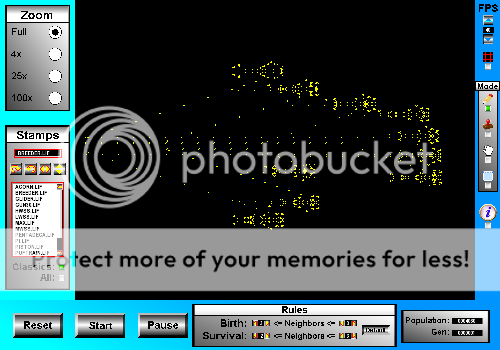
A classic Conway Breeder added using the stamp interface.
Controls:
- In draw mode add cells with the left mouse button and delete with the right.
- Magnification both with Zoom panel and scroll wheel.
- Panning with the arrow keys (and with the mouse in 'Grab Pan' mode).
Hotkeys:
- Space: Start
- p: Pause
- Backspace: Reset
- 1,2,3,4: Switch between Draw, Stamp, Drag-Pan, and Selector modes
- q,w,e,r: Stamp rotation and mirror copy hotkeys
- +,-: Increase/decrease desired speed (limited by computational speed)
- del,ctrl+x/c/v: Delete, cut, copy, and paste for Selector mode
- ctrl+s: Save all living cells in a pattern file
- g: Toggle grid on/off
- i: Toggle info window on/off
- ctrl+q: Hard quit (no prompt, immediate exit)
Rule Panel:
You know the Rules and so do I. Modify them here.
(Warning: Combinations resulting in explosive growth will quickly surpass the computational abilities of most computers.)
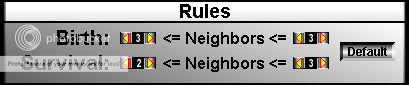
Explore other interesting patterns of emergent life.
Try:
- Birth (3,3) and Survival (1,5) for an interesting maze-like growth.
- Birth (4,8) and Survival (1,7) creates interesting seemingly aperiodic closed oscillators.
- Birth (3,4) and Survival (1,5) creates very strange octagonal life.
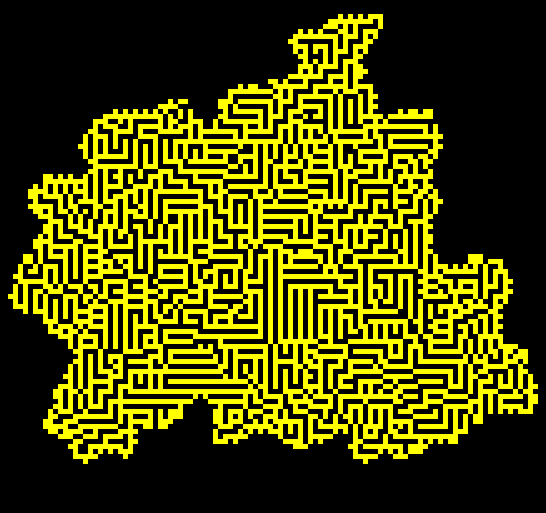
The above was generated with Birth (3,3) and Survival (1,5).
Stamp Mode (hotkey = 2):
"Life as a Bit" includes a database of well known and theoretically interesting patterns.
Using the stamp mode you can place these in any orientation using the rotation and mirror copy buttons.
A ghost image is also generated to assist in placement.
For those seeking a little more information, hit the information button and the available
information on the currently selected pattern will be displayed.
"Life as a Bit" reads three common formats of life pattern file ('Life 1.05', 'Life 1.06', and 'Run-Length-Encoded').
If you wish to add other patterns to the stamp database simply place your '*.lif' or '*.rle' file in
the 'lifep' subdirectory of the program.
The LifeWiki is a great place to find additional patterns and information.
Grab Pan Mode (hotkey = 3):
Pan with speed and ease using the mouse while in Grab-Pan mode.
Selector Mode (hotkey = 4):
Cut (ctrl+x), copy (ctrl+c), and delete using the convenient Selector mode. Simply place your selector rectangle using the mouse.
Cut and copied selections will be placed in the clipboard, and can be pasted in by pressing ctrl+v.
Selections can then be rotated and mirrored just as a stamp would.
Notes regarding saving (hotkey ctrl+s):
If you would like to save the currently living cells on the screen press ctrl+s.
Be aware however, the saved pattern will be named "savescreen.lif" and will be located in the "classic" directory.
If you do not rename this file, the next time you save, it will be overwritten.
Changes
Links
Releases
Life as a Bit 0.01 — 7 Nov, 2011
Life as a Bit DLX-v1.01 — 26 Dec, 2011
Life as a Bit DLX-1.00 — 18 Nov, 2011
Pygame.org account Comments
-
josmiley 2011-11-12 23:21
nothing happens, just displays gen
Mekire 2011-11-12 23:30
o.0 Did you add any cells to the field, or just hit start without adding anything?
-Mekjosmiley 2011-11-13 01:33
sorry ^^,
it would be nice to add cells holding the mousebutton downMekire 2011-11-13 08:41
^_^ Done... New download is up with mouse button holding functional for both adding and deleting cells.
-Mek
josmiley 2011-11-13 10:25
cool ...
it would be possible to add cells during generation ? :)Mekire 2011-11-14 06:46
Spawning during generation implemented. I also implemented/stole your method for generation calculation for the performance boost =P.
Next comes zoom controls and panning I think.
-Mek
josmiley 2011-11-14 07:44
no problem ^^
it just needs the ability to (auto)save the initial state ... -
josmiley 2011-11-19 08:51
What an improvement!
nice ...Mekire 2011-11-19 09:16
Thanks. This is what I had originally planned on doing but didn't because of the performance issues I was having. After you helped me solve that problem I went to town. =P
-Mek -
Rockachu2 2012-01-05 03:39
could you allow rendering to images? I would like to have a grid of 1920x1080, and an option would be nice.
Great pattern, looks intricate: birht:(1,1), survival(1,1)
diamond: (1,1), surv(1,3)Mekire 2012-01-05 11:24
Hmm... Yeah I suppose image saving could be added fairly easily. Right now I am trying to get a new release of one of my other projects done though so I might not get to it for awhile.
I do like those rule settings you posted; unfortunately they overpower my machine pretty fast.
Cheers,
-Mek -
Artofsk8 2012-06-16 15:59
O_o lots of work....?
Mekire 2012-06-17 18:27
I don't follow you. You mean it was lots of work to code? If you think so then you may be pursuing the wrong hobby. It is a pretty short program in the greater scheme of things.
-
James Lu 2012-06-21 18:16
love it there's a rocket stamp and a bird(hwss,lwss)
Logan Serino 2012-07-13 12:38
Hey, I saw ur review!
Mekire 2012-06-30 10:24
Glad you enjoyed it. I think the line puffer patterns are some of my favorites (but then I like a lot of them).
-Mek -
Yux50000 2012-07-12 18:04
Very cool application, but it always annoys me when people shove all of their game logic into one file. I prefer a more spread out, modular type thing, so I know exactly where to look when modifying things.
Mekire 2012-07-12 23:14
^_^ I understand. I actually started this program as a very minor side project and then it grew. The code could definitely be cleaned up more. Most of the GUI type things should probably be made into separate usable classes if nothing else; especially if I intend to ever reuse them in other programs. For the size of the program though, I don't know if I would bother creating more separate files or not though. Anyway, thanks for the download and hope you enjoyed it.
-Mek
-
James Lu 2014-12-22 21:17
Better than any other simulator, you can stamp.
-
James Lu 2014-12-22 21:28
Sequel to Life as a Bit:
Life in a Bitfort
like this one, but pixels must be bought.
Add many more gun designs.Load the Gopher gun and click run. Then try placing a pixel in front of the projectile; a big reaction will occur.
http://pmav.eu/stuff/javascrip...Living "people" would be non-stable reactions occurring in the fortress.
Walls could be penetrated by outgoing projectiles but nothing else.
To generate a random seed, make random small bits. Then see if it grows big enough, one seed had only 5 pixels and lived for many minutes.Also implement war.


Recent Releases
 SUPER JUMP DUDE - 0.6.3
1 Jun, 2026
SUPER JUMP DUDE - 0.6.3
1 Jun, 2026
 Imperial Ambitions - Three Kingdoms - 1.0
19 Mar, 2026
Imperial Ambitions - Three Kingdoms - 1.0
19 Mar, 2026
 Pygame menu - 4.5.4
19 Feb, 2026
Pygame menu - 4.5.4
19 Feb, 2026
 pgRPG - ECS pygame Game Engine - 0.1.0
4 Feb, 2026
pgRPG - ECS pygame Game Engine - 0.1.0
4 Feb, 2026
 AS Arrow - v 0.1.4
28 Jan, 2026
AS Arrow - v 0.1.4
28 Jan, 2026
 koxinga - v0.3.3
27 Jan, 2026
koxinga - v0.3.3
27 Jan, 2026
 PyDPainter - Release 2.2.1
21 Jan, 2026
PyDPainter - Release 2.2.1
21 Jan, 2026
 Trosnoth - 1.23.0
18 Jan, 2026
Trosnoth - 1.23.0
18 Jan, 2026
 Royal Ordains - 0.2.4
5 Jan, 2026
Royal Ordains - 0.2.4
5 Jan, 2026
 Divide & Conquer - 1.0
ALL the tags!