simple game gui - 0.9.1
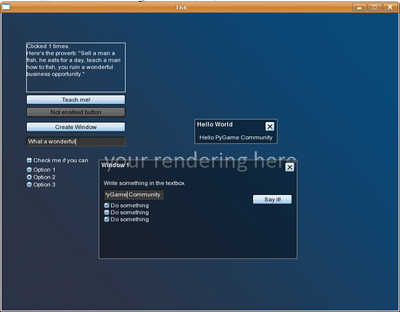
Simple, well integrated, fast, easy-to-use and easy-to-setup, gui system for pygame addressed to games mostly.

Canio Massimo Tristano
(keebus)
** IMPORTANT UPDATE **
This project is not under development anymore. Version 2 is in experimental phase and uses launchpad.net as a sharing and development platform for its making. Please feel free to join as you wish to the project (which is much more advanced than this old version).
You can find the official page at https://launchpad.net/simple-pygame-gui. Hope to see you there!
****
After evaluating different pygame gui systems, I finally decided that none was exactly the one I needed for my games, an easy-to-setup and to-use, fast, lightweight and well-integrated gui system.
The goal of this gui is to be extremely easy to use, and setup especially, and to be quickly and well integrated in any pygame game.
It's all contained in a py module: just import it and go!
Features implemented so far:
- No initialization needed. Just import and go.
- Style based GUI, to avoid to pass paremeters like font and font color everywhere, keeping your code compact and reusable
- Functions to create styles quickly (and not by hand).
- Optimizations to refresh your widget only when strictly needed.
- Desktop widget to contain all kinds of widgets, keeping them ordered correctly: if you add a button and a window to a desktop, the button will always be drawn UNDER the window.
- Label widget with autosizing and wordwrapping.
- Skinnable button widget with all kinds of statuses (normal, mouse-over, pressed and disabled).
- Skinnable (or vector) window widget with fast z-ordering. Just add it to your desktop widget, and it will do the rest. - Full-featured textbox widget, with flat or 3D appearence, automatic scrolling (singleline text so far but going to upgrade it soon).
- Skinnable ImageButton to create your personal button based on images (one for each status).
- Skinnable CheckBox and Optionbox.
- Customizable ListBox with mouse-wheel/keyboard scrolling.
Thanks for reading ;)
For any explanation/need, just send me an email, I'll be glad to help you. :)
Changes
Thanks to Mark Gerads for contribution.
Mark Gerads added:
- Window shade button
- Window.close()
- Window onClose, onMove, onMoveStop callbacks
- Shaded style colors
- Updated test.py
I've create a google-code page for this project. If anyone is interested in development, just become a member.
Thanks, as always.
Mark Gerads added:
- Window shade button
- Window.close()
- Window onClose, onMove, onMoveStop callbacks
- Shaded style colors
- Updated test.py
I've create a google-code page for this project. If anyone is interested in development, just become a member.
Thanks, as always.
Links
Releases
simple game gui 0.8.1 — 3 Jun, 2008
simple game gui 0.9.1 — 10 Jun, 2008
simple game gui 0.9.2 — 11 Jun, 2008
Pygame.org account Comments
-
Callum Powys 2011-07-27 13:16
For me, the height of the buttons are constant no matter what argument I pass in for it.

Recent Releases
6 Jun, 2026
 SUPER JUMP DUDE - 0.6.3
1 Jun, 2026
SUPER JUMP DUDE - 0.6.3
1 Jun, 2026
 Imperial Ambitions - Three Kingdoms - 1.0
19 Mar, 2026
Imperial Ambitions - Three Kingdoms - 1.0
19 Mar, 2026
 Pygame menu - 4.5.4
19 Feb, 2026
Pygame menu - 4.5.4
19 Feb, 2026
 pgRPG - ECS pygame Game Engine - 0.1.0
4 Feb, 2026
pgRPG - ECS pygame Game Engine - 0.1.0
4 Feb, 2026
 AS Arrow - v 0.1.4
28 Jan, 2026
AS Arrow - v 0.1.4
28 Jan, 2026
 koxinga - v0.3.3
27 Jan, 2026
koxinga - v0.3.3
27 Jan, 2026
 PyDPainter - Release 2.2.1
21 Jan, 2026
PyDPainter - Release 2.2.1
21 Jan, 2026
 Trosnoth - 1.23.0
18 Jan, 2026
Trosnoth - 1.23.0
18 Jan, 2026
 Royal Ordains - 0.2.4
5 Jan, 2026
Royal Ordains - 0.2.4
5 Jan, 2026
 Divide & Conquer - 1.0
SUPER JUMP DUDE - 0.6.3
1 Jun, 2026
Imperial Ambitions - Three Kingdoms - 1.0
19 Mar, 2026
Pygame menu - 4.5.4
19 Feb, 2026
pgRPG - ECS pygame Game Engine - 0.1.0
4 Feb, 2026
AS Arrow - v 0.1.4
28 Jan, 2026
koxinga - v0.3.3
27 Jan, 2026
PyDPainter - Release 2.2.1
21 Jan, 2026
Trosnoth - 1.23.0
18 Jan, 2026
Royal Ordains - 0.2.4
5 Jan, 2026
Divide & Conquer - 1.0
pygame 845
2d 780
arcade 744
game 397
puzzle 342
python 342
shooter 263
strategy 258
action 221
space 153
other 152
libraries 151
simple 143
platformer 140
multiplayer 127
rpg 118
retro 98
applications 93
3d 87
gpl 82
pyopengl 74
snake 72
pyweek 71
geometrian 68
library 66
gui 64
physics 62
engine 59
simulation 55
adventure 52
ALL the tags!
ALL the tags!